
I have been building on the web for more than a decade. WordPress was not the last platform I tried before deciding to build my own infrastructure. It was one of seven, and in my opinion, working across all of them was the education I needed. The moment that clarified the decision came last year, when a client called because a routine plugin update had turned their checkout into a security incident. Nothing in the site had changed except the update. The trust model underneath the platform had broken, and the business was the one left holding the damage.
The Decision Every Platform Eventually Faces
Each platform taught me something different, and the pattern across all of them led to the same conclusion: every platform makes decisions for you. That is the value proposition when you are starting. It becomes the constraint when your requirements evolve past the decisions the platform made.
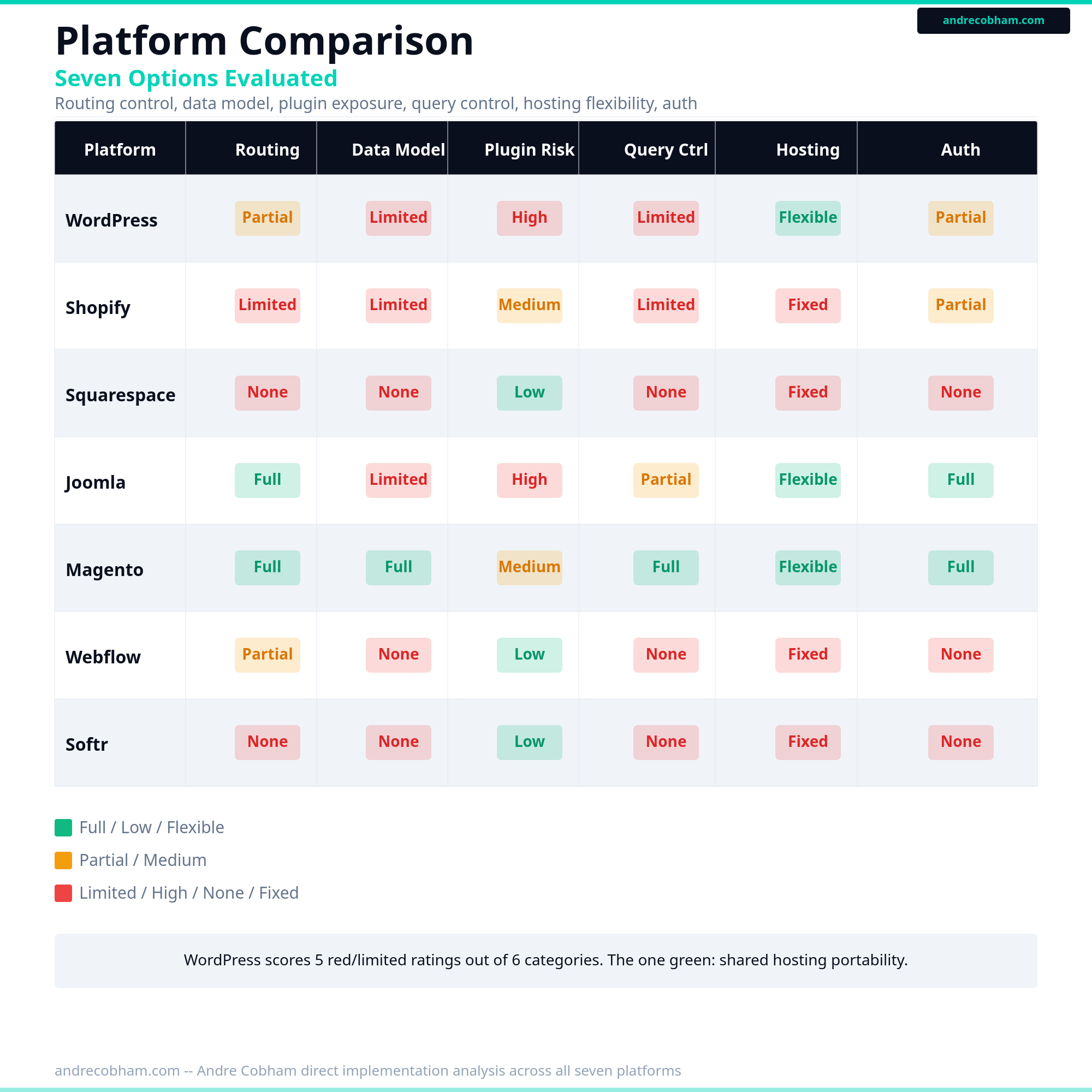
Over the course of working in digital marketing and web development, I have shipped real work on all of the following platforms. Here is my honest assessment of each one: what it does well and where, in my experience, it stops being the right tool.
WordPress: the standard for a reason. Content management, SEO tooling, and an enormous ecosystem make it the correct answer for editorial publishing and standard business sites. The plugin architecture is flexible and well-documented.
Shopify and Liquid: purpose-built for commerce. Liquid templating is constrained by design, and that constraint is a feature. It works well for standard store configurations. When your store logic moves outside of what Liquid was designed to express, the constraint becomes visible. That is not a criticism. In my experience, it is exactly what keeps most Shopify stores well-structured.
Squarespace: design-first, and the visual quality is real. The best option for portfolio and simple service sites where the design carries the experience. The ceiling is also real: there is no path to custom server-side logic.
Joomla: established in 2005 and still in active development. More technically oriented than WordPress. The extension model is capable. The learning curve reflects that capability, and the ecosystem is smaller.
Magento, now Adobe Commerce: genuine enterprise commerce depth. The configuration options are impressive. Running it well requires infrastructure investment that reflects what it is: a complex, capable platform for large-scale retail.
Webflow: the best visual builder available. CSS is first-class. Interactions are manageable without writing JavaScript. The moment you need custom server-side logic, you have reached the boundary of what it supports. My take: Webflow is the right answer more often than developers give it credit for.
Softr: no-code front-end on Airtable or Google Sheets. The right tool for internal tools and quick MVPs. Not designed for customer-facing production workloads that require custom data models or transactional logic.
Platform Assessment
What Every Platform Has in Common
Every platform above makes decisions for you about routing, data storage, the request lifecycle, and how templates consume data. Those decisions eliminate hundreds of choices that would otherwise sit in front of you. That is the core value: reduced surface area, faster time to something working, a community of people who have solved the same problems.
The same decisions become constraints when what you are building no longer fits the model the platform assumed. This is not a design flaw in any of them. It is an honest trade-off. The platform is optimized for the majority use case. In my experience, most projects are in the majority, and the honest answer is that the platform is correct for them. If your requirements have moved outside it, the platform starts to work against you rather than for you.
Why I stopped using WordPress is the same reason I eventually hit limits on each of the platforms above. The requirements of what I was building moved past the decisions the platform had made. That is the pattern.
What Building Outside a Platform Changes
Here is the thought I want to share clearly, and why I consider it worth writing about: most businesses should not build their own web infrastructure from scratch. The platforms above exist because they solve real, recurring problems well. The case for moving outside a platform is narrow and specific: when your integration requirements genuinely cannot be expressed within the platform's model, when the maintenance overhead has become disproportionate to what the platform is delivering, or when your performance and reliability requirements exceed what the platform supports cleanly without significant workarounds. If none of those conditions are true, the platform is the correct choice.
What I learned across ten years and seven platforms is that this decision is a threshold question, not a preference. The platform's value comes from the decisions it made for you. The cost is the same decisions, applied to cases they were not designed for. Recognizing the threshold is the work.
Where WordPress Specifically Loses Ground
WordPress is transparent about how it works, which I consider one of its real strengths. It also makes it easier to be specific about where it creates friction.
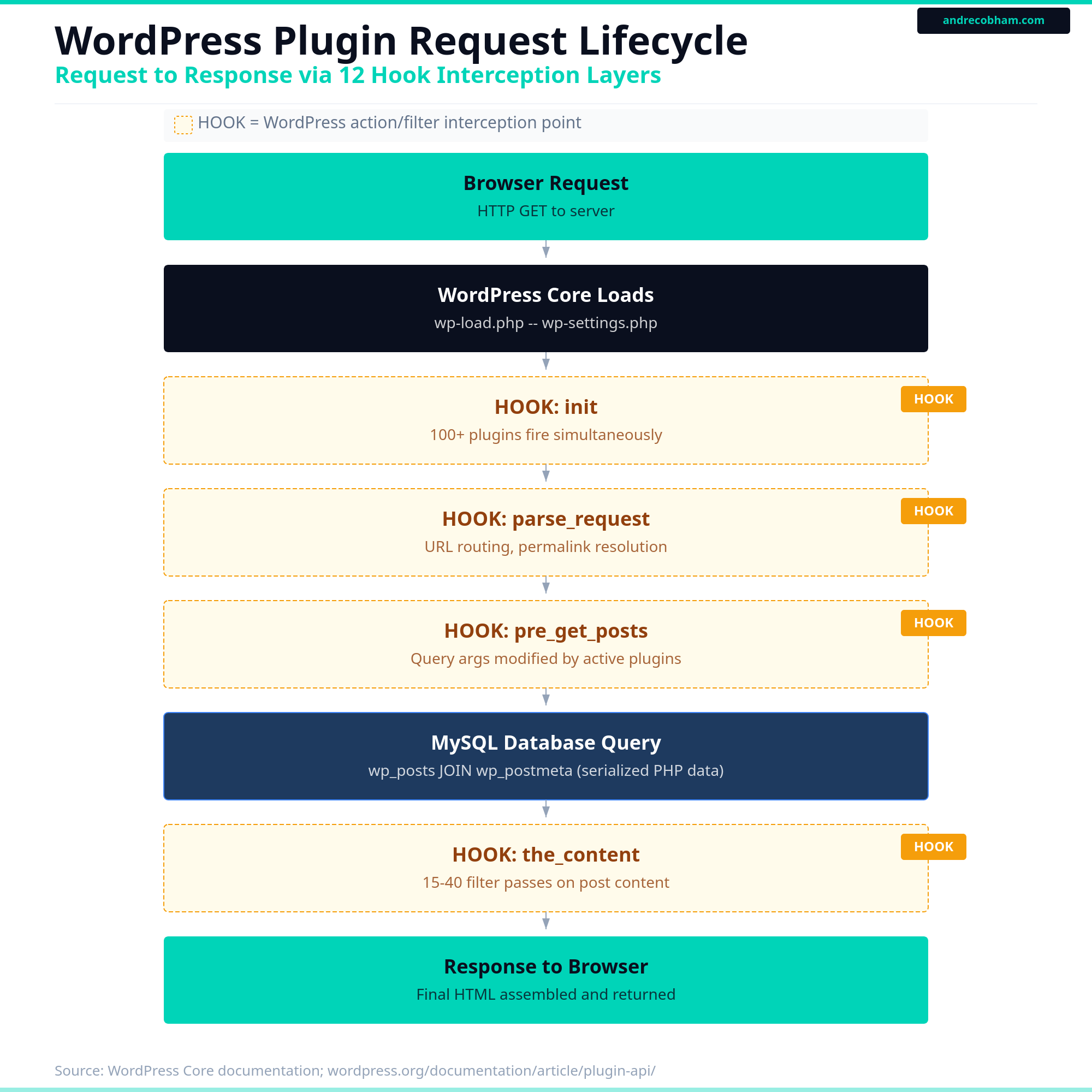
The plugin architecture, documented at wordpress.org/documentation, allows plugins to hook into core at action and filter points throughout the request lifecycle. When two plugins both modify the same hook, the behavior depends on execution order and how each plugin was written. Conflicts at this layer are not edge cases. They are the expected outcome of a large ecosystem where plugins do not coordinate with each other.
Security surface area is a related consideration. The WordPress security team publishes disclosures publicly. A large, active plugin ecosystem means a consistently large number of disclosed vulnerabilities across that ecosystem each year. Maintenance is ongoing, not optional.
The REST API is well-documented at developer.wordpress.org/rest-api, but every custom integration requires mapping your data model into WordPress post types and taxonomies. When your data does not fit that model, the integration requires workarounds at multiple layers.
WordPress Request Lifecycle
Render Blocking Is a Separate Problem
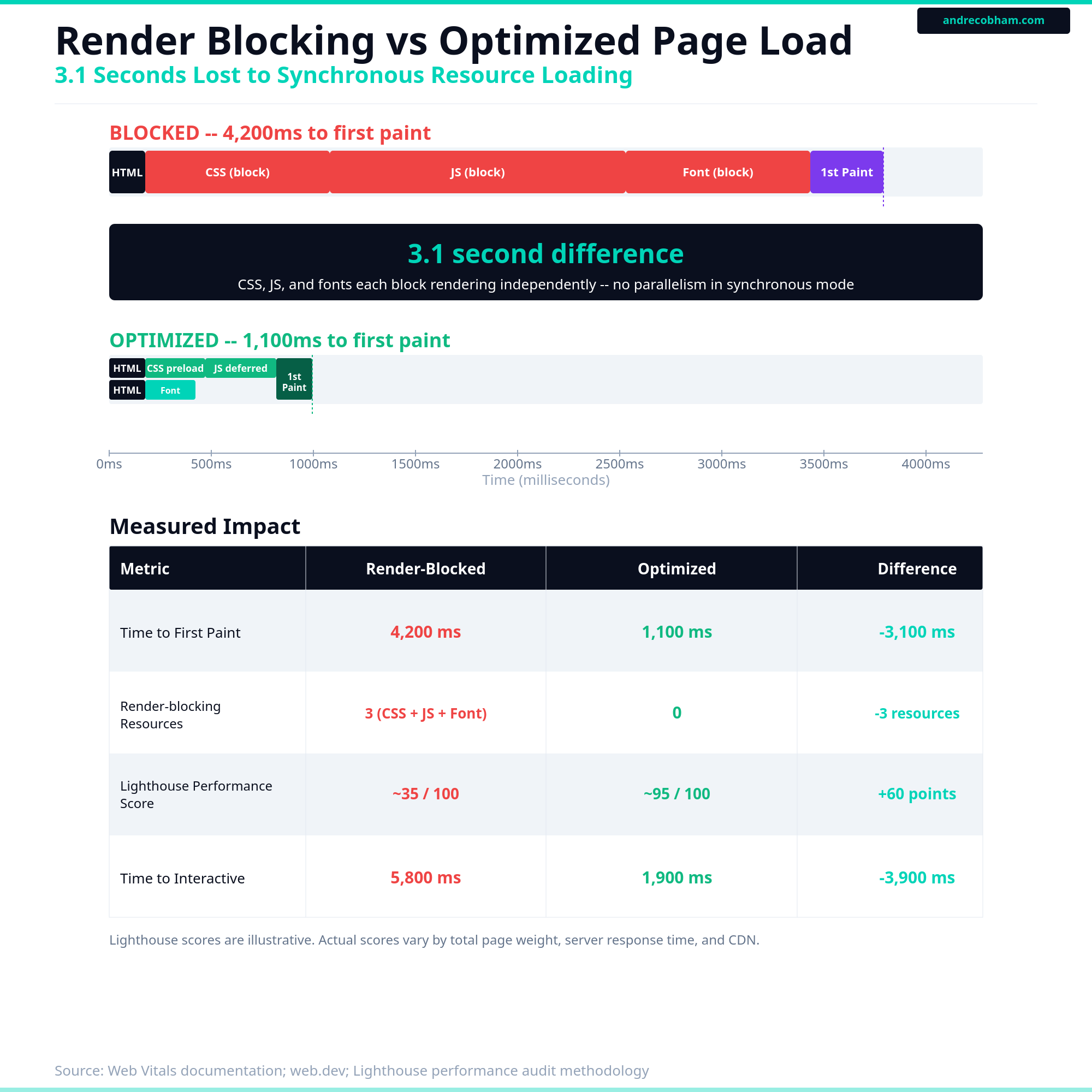
One friction point that gets attributed to WordPress but is actually a build and configuration problem across all platforms is render blocking. Synchronous CSS in the document head, undeferred JavaScript, and externally hosted fonts all delay first paint regardless of which platform generated the HTML. I covered the mechanics and what the data shows about load time and conversion in a separate post: Why Your Website Is Losing Customers Before the Page Loads. The short version is that render-blocking resources hold the browser's first paint hostage until they are fully downloaded and parsed. The fix is configuration, not platform choice.
First Paint Timeline
The Database Model WordPress Uses
WordPress stores everything in five core tables. The design reflects the platform's origin as a blogging tool and remains largely unchanged since version 2. I have audited installations where the autoloaded option set alone exceeded 2MB per request, before a single piece of content was fetched. That cost compounds on every page load, and there is no architectural path around it without rebuilding how WordPress uses wp_options.
wp_posts handles content. Not just posts: pages, attachments, navigation menus, custom post types, and every draft revision all live in the same table, separated by a post_type column. A standard installation with moderate traffic accumulates tens of thousands of rows with no structural separation between content types.
wp_postmeta stores field-level data as key-value pairs. The meta_value column holds serialized PHP arrays and objects rather than typed data. Querying posts by a custom field requires joining wp_posts to wp_postmeta and running a string comparison against serialized content. Indexing that query requires workarounds that add complexity proportional to the data volume.
wp_options stores site configuration. This table contains serialized PHP objects: widget settings, plugin configurations, theme options, API credentials, OAuth tokens. An autoload column flags which options are loaded on every page request. I have audited installations where the autoloaded option set exceeded 2MB loaded into memory per request, before any content is fetched.
The model works for what it was designed to do. When your data model includes typed fields, relational integrity, or structured queries across custom attributes, you are mapping requirements into a system that was built for a different shape of data.
WordPress Core Database Schema
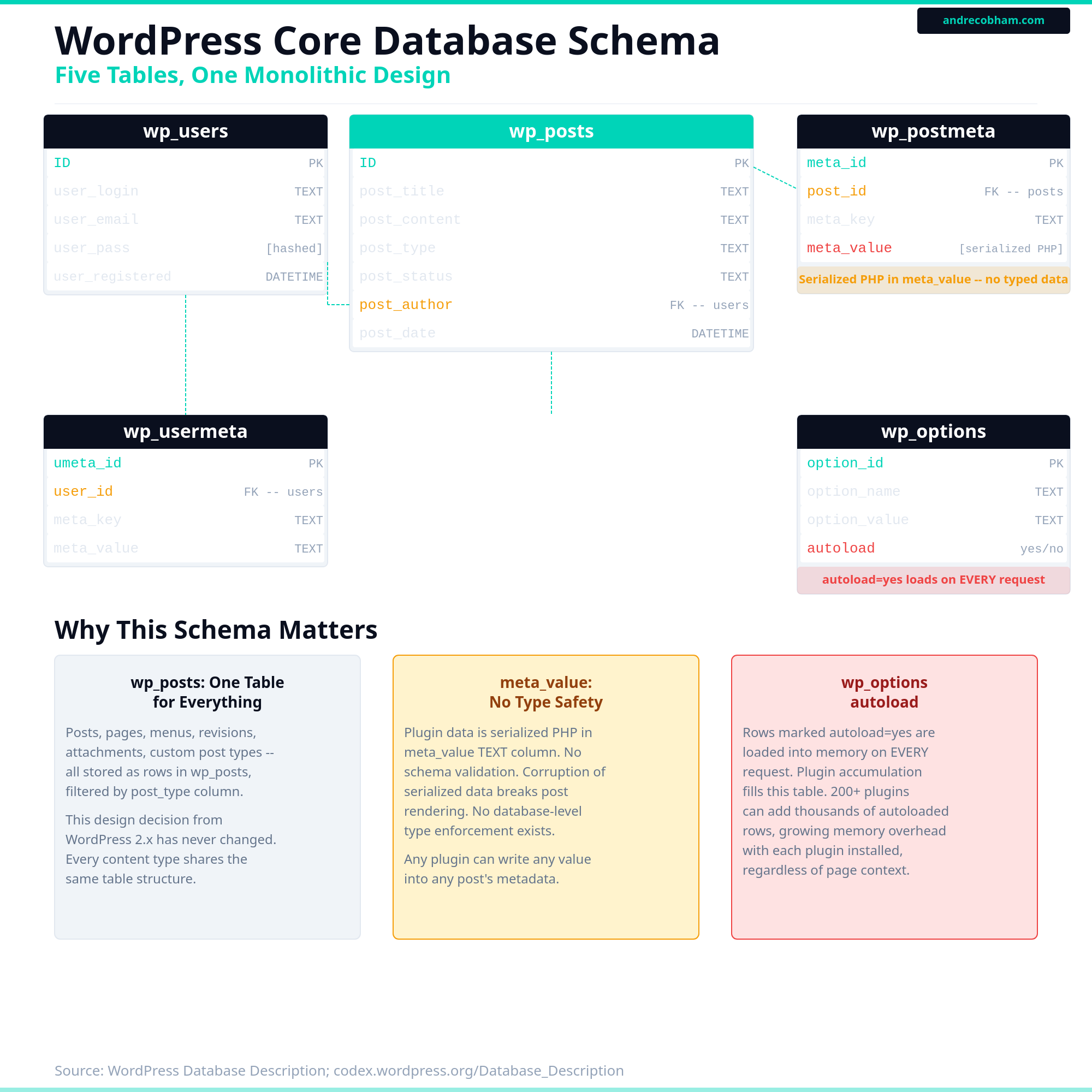
The meta_value column in both wp_postmeta and wp_usermeta stores serialized PHP. Querying against it requires string comparison, not indexed field lookup.
The Security Numbers
These are documented, publicly available figures. I am citing sources so you can verify them.
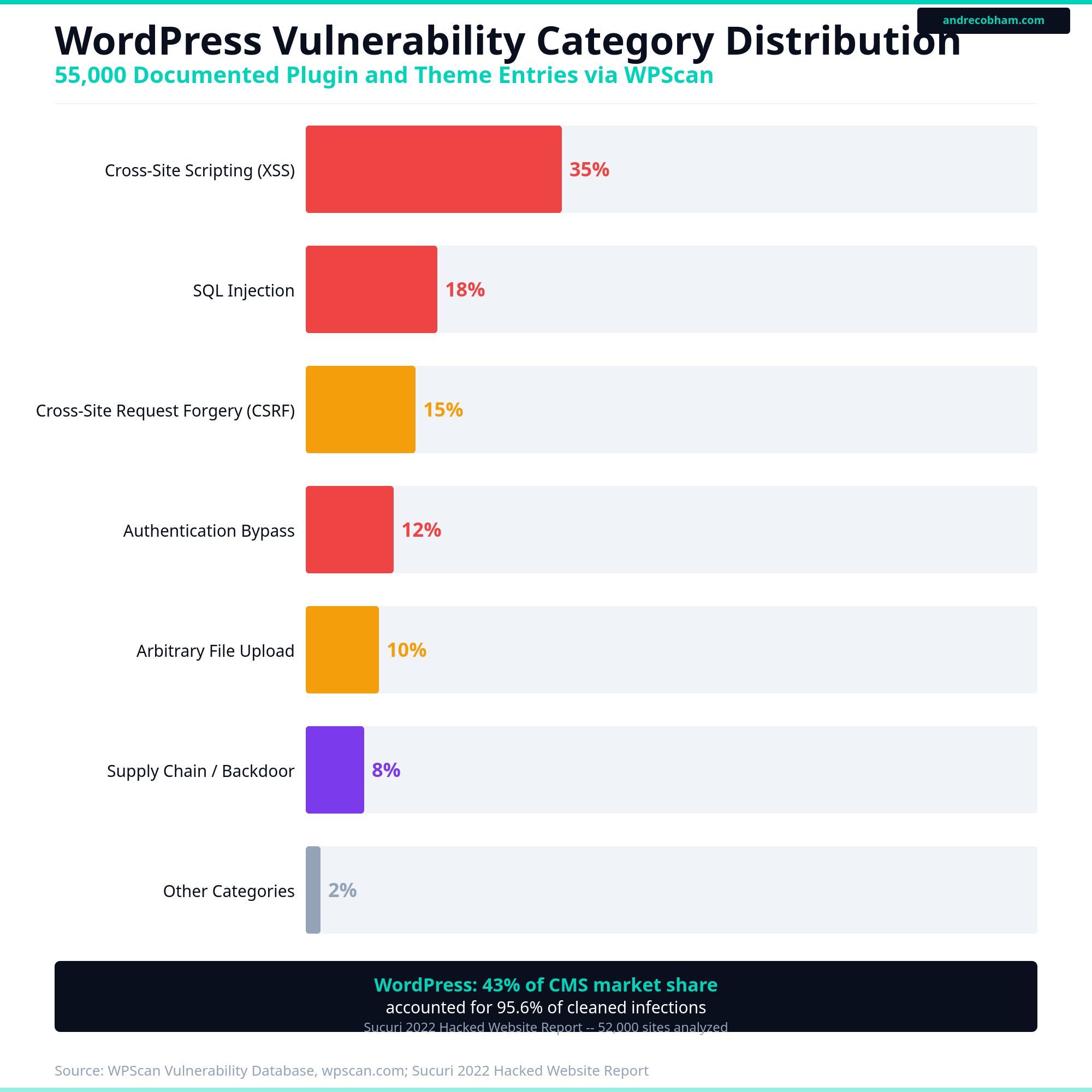
The WPScan vulnerability database, maintained independently and now integrated with Jetpack Scan, contains over 55,000 documented vulnerability entries spanning plugins, themes, and core releases. The database is publicly searchable at wpscan.com. The entries are not theoretical. They are disclosed, confirmed vulnerabilities with assigned CVE identifiers where applicable.
Sucuri's 2022 Hacked Website Report analyzed 52,000 infected websites they remediated. WordPress accounted for 95.6% of those infections. That figure requires context: WordPress represents approximately 43% of all websites by active install count. A platform that holds 43% of market share accounting for 95.6% of cleaned infections indicates a structural concentration of risk, not just a reflection of popularity.
The AccessPress supply chain incident, disclosed by Sucuri researchers in January 2022, illustrates a specific attack vector that the WordPress model is structurally susceptible to. Forty-seven plugins and 46 themes available in the official WordPress.org repository were found to contain backdoor code. The combined install base exceeded 360,000 active WordPress sites. The attack did not exploit a vulnerability in the plugin code. The plugin files distributed through the official channel were the attack. The trust relationship between the official repository and the sites that installed from it was the mechanism.
The attack surface concentrates at the plugin layer, not WordPress core. The core security team operates a coordinated disclosure process and ships patches promptly. Maintaining a secure WordPress installation requires tracking the vulnerability status of every installed plugin, not just WordPress core version compliance. That is a different and ongoing maintenance process.
The supply-chain figure from AccessPress is the one I keep returning to. Over 360,000 sites received backdoor code through a normal update to a plugin they had deliberately chosen to trust. That is not a patching failure. It is a consequence of delegating execution rights to code you do not own or review.
Vulnerability Categories in WPScan Database
Shared Hosting and Contamination Risk
Most WordPress installations run on shared hosting. The risk profile of shared hosting is structurally different from a dedicated server or containerized deployment, and the difference matters when one of your neighbors on that server is compromised.
A shared hosting environment runs multiple customer sites under a single operating system. PHP processes typically run under a shared system user or under per-user contexts with varying isolation depending on the host's configuration. A documented exploitation technique, server-side file traversal via symlinks, allows an attacker who has gained file system write access to one site to navigate to adjacent virtual hosts and read their files. The success of this technique depends on server configuration, but it is well-documented and actively exploited in shared environments.
WordPress stores database credentials in wp-config.php as plaintext PHP constants: database host, database name, username, and password. If the file system is readable by an attacker, the credentials are readable. This is not a WordPress vulnerability specifically. It is a plaintext credential storage pattern that becomes material when file system access is not guaranteed to be isolated.
The secondary risk is malware propagation. Sucuri's research documents cases where a single compromised site on a shared server is used to inject malicious code into adjacent sites through shared PHP session directories, writable /tmp space, or file permission misconfigurations at the server level. The entry point is one site. The blast radius extends to every site on the same physical host.
Over the years I have helped clients migrate off shared hosting for this specific reason. The economics make sense at the start. The risk profile changes the moment the site handles anything that matters: form submissions, client contact data, administrator sessions. At that point the cost of a neighbor's breach is no longer theoretical.
Shared Hosting Contamination Path
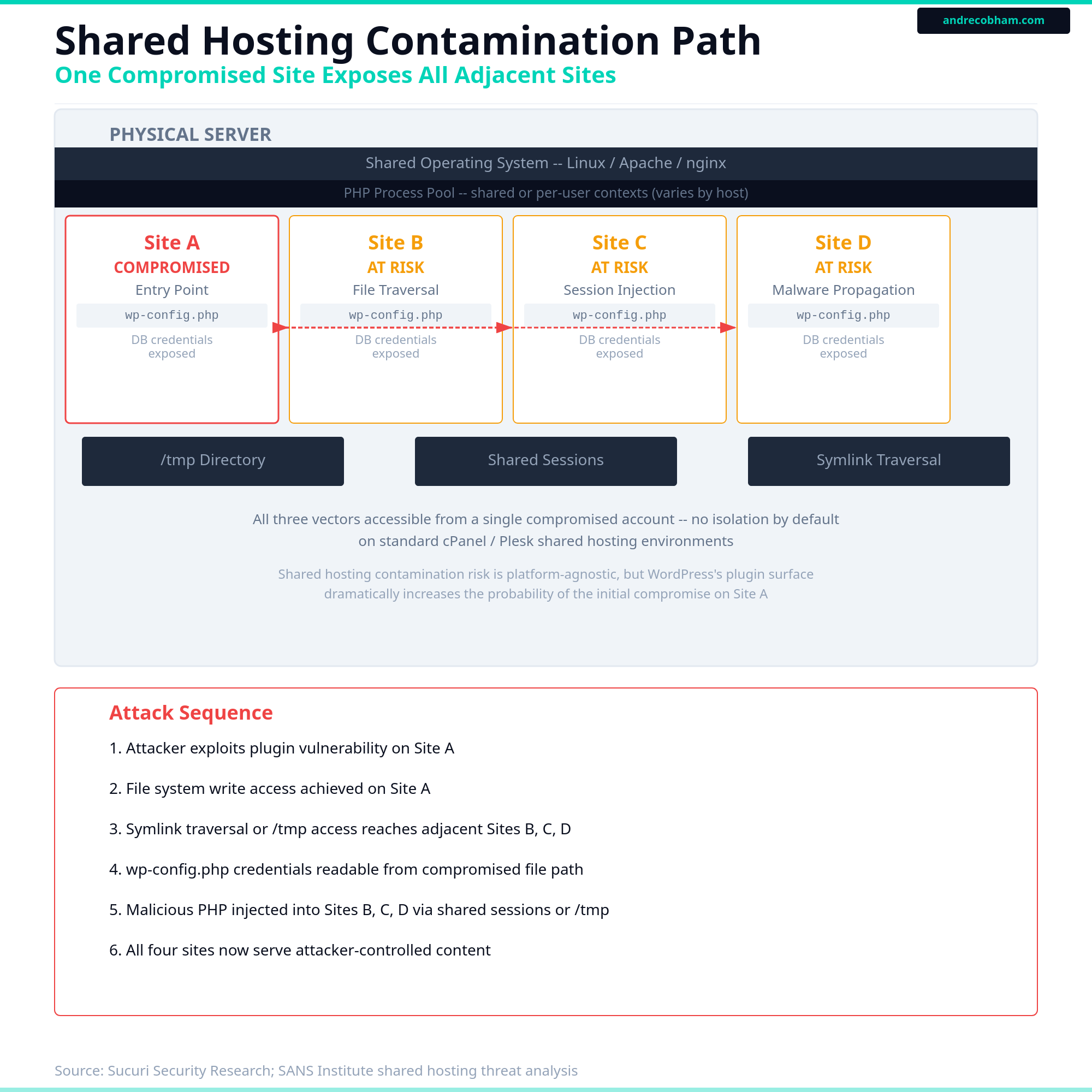
Source: Sucuri Hacked Website Report 2022. Cross-site contamination via shared server resources is documented across multiple hosting environments.
The Plugin Trust Chain
WordPress.org allows any registered account to publish a plugin in the plugin directory. Plugins undergo a basic compliance review before listing. That review does not guarantee security correctness or behavioral integrity. Once listed, a plugin can be transferred to a new owner. The new owner inherits the active install base.
A plugin with 100,000 active installs represents 100,000 WordPress sites where that plugin's code executes inside the PHP request lifecycle. WordPress exposes a global $wpdb database object to every plugin. A plugin running with that access has read and write access to wp_users, wp_options, and every other table in the database. It has access to the current request context, including any administrator session active at the time the request fires. It can create new user accounts, modify existing permissions, insert arbitrary content, or initiate outbound connections.
The AccessPress case is the most documented example. Forty-seven plugins and 46 themes available through the official WordPress.org directory were found to contain backdoor code injected at the source. Installing from the official repository was not a protection. The compromise occurred at the distribution layer before the files reached any WordPress installation.
This is not a case for avoiding plugins entirely. Most plugins do what they describe. The point is that the trust model is implicit. Choosing a plugin is a trust decision that extends to every future version and every future owner of that plugin, not just the version you installed.
After reviewing plugin lists on several client installations, I found code running under plugin namespaces I could not trace to a known source, in plugins that had changed ownership without any visible notification. What was installed at setup is not always what is executing in production.
Plugin Trust Chain
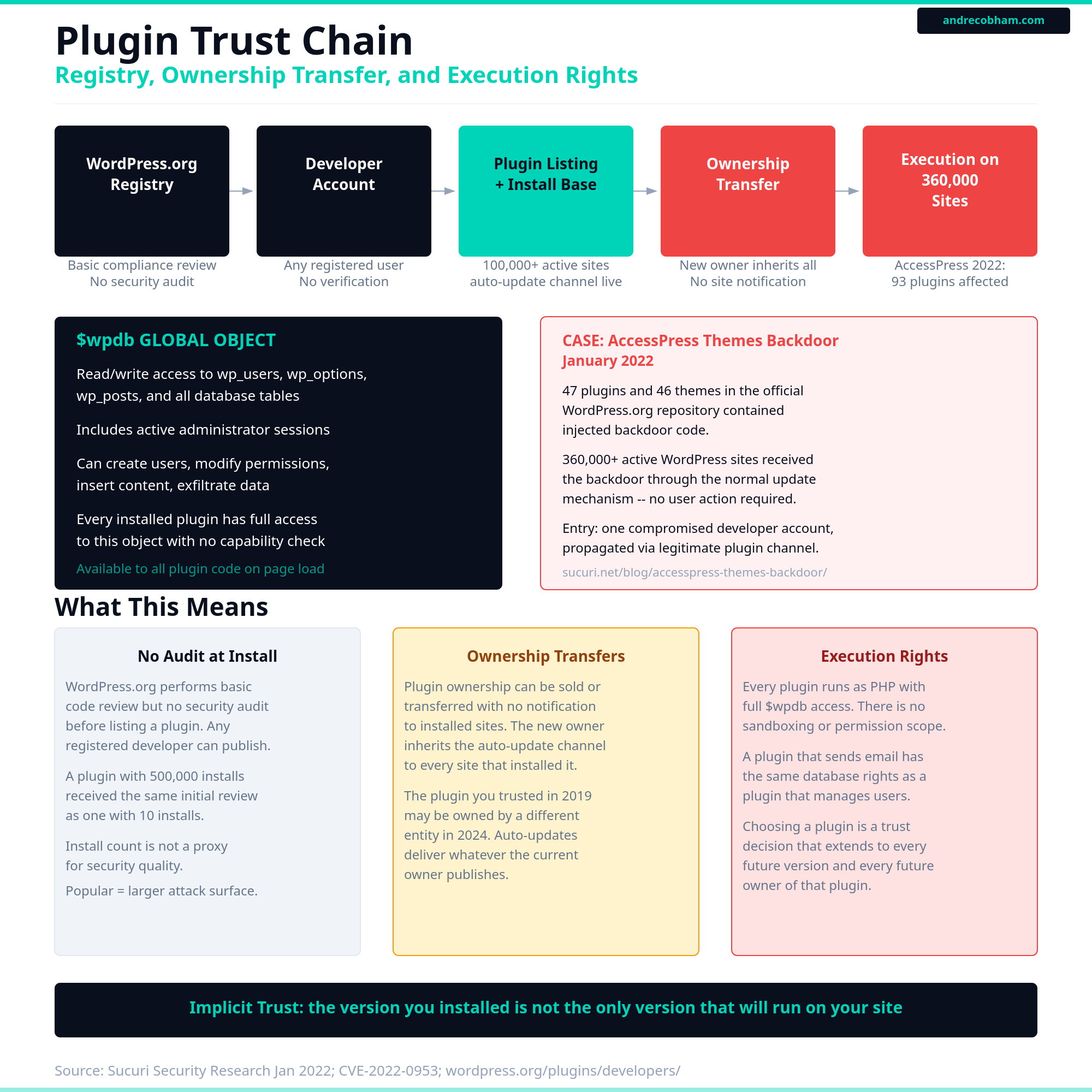
Source: Sucuri Security Research, January 2022. AccessPress Themes supply chain backdoor. sucuri.net/blog/accesspress-themes-backdoor/
When to Build Outside a Platform
If you are at that threshold and you want to understand what the alternative looks like for your specific situation, I can help you map it. Sometimes the answer is a targeted integration that offloads the friction without a full rebuild. Start the conversation here.